Thursday, August 14, 2008


Monday, August 04, 2008
Saturday, March 08, 2008
聆听•关爱——信诚人寿爱心捐助受灾中小学校建设行动
聆听·关爱
——信诚人寿爱心捐助受灾中小学校建设行动
尊敬的先生/女士:
您好!
2008年,肆虐的风雪终于收尽余威,截至2月22日,统计显示全国共有3.6万所中小学不同程度受灾,涉及学生28万人,目前全国尚有1300多所学校因为受灾不能正常开学。
2月26日,信诚人寿面向全国发出倡议:面对曾经肆虐的雪灾以及任重道远的灾后重建工作,以"聆听·关爱"为己任的信诚人,将行动起来!
我司募集的资金,将帮助部分受灾的学校重建,让受灾地区,尤其是贫困受灾地区的孩子们能尽早复课,听到孩子们的朗朗读书声,看到他们在操场上玩耍的快乐身影!
为此,信诚北分将从3月1日起至3月31日,在所有内外勤员工以及广大客户中开展"聆听· 关爱——信诚人寿爱心捐助受灾中小学校建设行动",所有收到的款项将致力于湖北、广西等贫困受灾地区的中小学校的建设,为那些需要帮助的孩子们献上我们最真切的关怀。
活动期间,只要您在信诚人寿购买任何一张保单,都将成为信诚人寿的"爱心大使",我司也将同时以客户的名义捐出10元捐款给予灾区,把您的爱心送到孩子们的身边。
聆听,在山河之内;关爱,在重建声中。为了 的孩子们,让我们行动起来,伸出你我的双手,凝聚你我的力量,献出我们的爱心,温暖他们的心,点亮他们上学的路!有您,这个春天更温暖!
2008年信诚人寿"聆听·关爱"
信诚人寿爱心捐助受灾中小学校建设行动
千份爱心接力
我,信诚人寿保险公司理财经理,决定联合1000个有爱心的人士向灾区的小朋友们献出千份爱心,让他们能早日回到学校,回到阳光明媚的教室。
接力的时间:3月7日~3月31日
操作的方法:
- 向100个朋友宣传自己的想法,寻求他们的帮助,每个朋友帮助向10个他的朋友宣传,最终实现向1000个人宣传!
- 在东方广场做路演,向1000个人宣传我们的活动倡议!
- 两种方法,双管齐下,只要付出了,我们一定会收获。收获我们的爱心!收获我们自己!
动力分析:
- 灾区:对灾区的重建工作有很大帮助,10000元最少能帮助50个小朋友重返校园。
- 每个爱心接力人:每个人都有了很好的保险意识,深化了对自己的爱人和亲人的责任和爱心的理解,并做了交通意外方面的保障。
- 1000个爱心大使:我们组成了一张巨大的爱心接力网络,我们联合起来可以做更多的爱心接力活动,我们的人生会更加丰富和有意义。
- 对我,接力发起人,人性的考验。我是真有爱心,还仅是大脑里想想、嘴上说说。行动证明一切!
- Just Do It!
Sunday, October 28, 2007
Add blogger sitemap to google
yourblog.blogspot.com/atom.xml
yourblog.blogspot.com/rss.xml
--
Happy day, happy life!
Haven't got your own portal? Get it here! http://www.diyportals.com/
Portal Features:
A.Signup Free
B.50MB of disk space
C.1GB data transfer
D.Plenty of free Modules
E.Custom Business Module Development Services
F.The Latest DotNetNuke (04.06.02)
How do I track visitors to my blog
Many bloggers are interested in knowing how often their blog was viewed. What you need is a hits counter. You can get a free hit counter here at StatCounter.com. After you sign up for an account, you will be taken through a series of steps to generate codes to paste into your template. You will have to provide a title and give the url of your blog, choose a category and select from a series of options. You may just accept the default if you want a counter similar to what you see at the bottom of this page (you may also select the invisible option). There will be just one option where no default is given and that is whether your website uses frames. Select NO. There is a further option of whether you want the script generated for your counter to be XHTML compliant or not. For the New Blogger, I have earlier found that leaving this unticked can give a working counter. But if you are using a New Blogger template, it is probably betting to tick that option. When the codes are generated, highlight it and copy the codes.
Sign into Dashboard, select the relevant blog, click the TEMPLATE tab to get to the template editor to edit the template. Paste the codes after the <body> tag and before the </body> tag. If you chose an invisible counter, you can follow the instruction in the post exactly, and it doesn't matter whether you are using the old classic template or the New Blogger template. If you chose a visible counter, the counter will appear at the bottom of the page. If you want the visible counter to appear elsewhere and you are using the old classic Blogger template, you will have to refer to this post Blogger template tutorial (old classic template): Adding stuff via the template for a guide as to where to paste the script.
If you chose an invisible counter, the number of steps is very much less. Note that Statcounter have changed a bit since this post was written and I think I need to do an update/redit or a new post,
--
Happy day, happy life!
Haven't got your own portal? Get it here! http://www.diyportals.com/
Portal Features:
A.Signup Free
B.50MB of disk space
C.1GB data transfer
D.Plenty of free Modules
E.Custom Business Module Development Services
F.The Latest DotNetNuke (04.06.02 )
101 Steps to Becoming a Better Blogger
I have noticed that the most successful bloggers online have all taken similar steps in becoming great bloggers. After lots
of research and study, I can also tell you that blogging is much more complex than it seems to be on the surface. However, with a bit of effort, I believe anyone can become a successful blogger.
Here are 101 steps to becoming a better blogger…
1. First, I'm going to assume you're using Wordpress. You are using Wordpress aren't you? The built-in SEO and pinging functions make Wordpress a search engine machine.
2. Sign up for Feedburner.
3. Post at least once a day.
4. Optimize your blog for the search engines.
5. Make sure you have an "About Me" page.
6. Submit your blog to 9Rules.
7. Submit your blog to NewsNow.
8. Let your readers see the REAL you. Blogging is more personal than conventional websites. Don't be afraid to tell a few
stories from your own life. By being real and personal, you will build a relationship with your readers based on loyalty and trust.
9. Blog and ping.
10. Submit your blog to rss and blog directories.
11. Use trackbacks.
12. Get involved in the blogosphere. Being a blogger is about being part of a community. Leave comments on other
blogs and get to know your favorite bloggers.
13. Give your blog it's own unique voice… You!
14. Spend 99% of your time focused on creating unique, quality content. Content is King; or as John Reese says, "content is King Kong".
15. Add a large RSS subscription button to your site.
16. Place an RSS feed link at the bottom of every post.
17. Set up a MyBlogLog Widget.
18. Encourage social bookmarking after every post.
Install these plugins to optimize your blog:
19. Akismet - This plugin helps eliminate comment spam.
20. Optimal Title - This plugin allows you to optimize the title of your blog post in order to improve your search engine rankings.
21. Ultimate Tag Warrior - The best tag system for WordPress.
22. Google Sitemap Generator - This plugin will enable you to automatically generate a Google sitemap for your blog.
23. Show Top Commentators - This plugin encourages feedback and discussion by rewarding the top commentators with a link back to their site in the sidebar.
24. Related Posts - This plugin will find other blog posts that are related to the current post. This encourages extra page views and keeps readers at your blog for a longer period of time.
25. Super Archive - One of the best archives system.
26. WP-Cache - This plugin is an extremely efficient caching system that will make your site much faster.
27. WP-ContactForm - This plugin allows your readers to easily email you. It also helps avoid spam.
28. Popularity Contest - This plugin determines which of your posts are most popular and then puts them in the sidebar.
29. Adsense Deluxe - This plugin makes it easy to implement Adsense into your blog.
30. Sociable - This plugin helps you spread your content through social bookmarking sites like Digg, del.icio.us,reddit, and others.
31. Feedburner Feed Replacement - This plugin directs all of your feed traffic to Feedburner, ensuring accurate readership stats. This plugin will also convert any existing subscribers from the old feed to the FeedBurner
one.
32. Create a custom blog design. Your blog is a symbol of your brand. Make it uniquely you.
33. Add photos to each of your posts.
34. Use tagging.
35. Share the link love.
36. Publish a full feed instead of a partial feed.
37. Consider approaching newspapers with a story about your blog. Remember, journalists are hungry for content and if
you can come up with a unique twist, then you could get some great coverage.
38. Persistence is the key. Give your blog at least 6 months before you start expecting great returns on all of your hard work. Believe me, it will pay off in the long run.
39. Submit exclusive content to high-profile sites.
40. Syndicate a press release. Take some time to craft a truly compelling and newsworthy press release and send it to some of the top journalists and bloggers. You can then submit it to the main press release sites, including PRWeb and PRLeap.
41. Turn your articles into podcasts.
42. Turn your articles into videos using PowerPoint to create an entertaining slideshow. Submit your video to all of the
popular video sites, including Google Video, YouTube, and others.
43. Submit to blog carnivals.
44. Participate in and submit to social web 2.0 sites, including Reddit, Digg, Delicious, Netscape, and Stumble Upon.
45. Turn your articles into downloadable reports/ebooks.
46. Join Blogburst.
47. Syndicate your articles to EzineArticles, GoArticles, iSnare,
American Chronicle, and other high-profile article directories.
48. Exchange guest posts with other bloggers.
49. Participate in group writing projects and memes.
50. Create a Squidoo lens that links back to your blog and established you as an industry expert in your chosen field.
51. Interview industry experts. This is one of the best ways to create original, engaging content.
52. Offer an e-mail newsletter in addition to RSS. An email newsletter allows you to form a closer relationship with
your visitors and picks up those who still aren't comfortable with RSS technology.
53. Ask your visitors for suggestions on how to improve your website's content because in the end, it's really all about your readers.
54. Create a customized 404 page.
55. Claim your blog on Technorati.
56. Enable automatic trackback and ping functionality.
57. If someone mentions your website on their blog, thank that blogger in the comments of the post and send them a thank you note. You can monitor any mentions of your blog using Google Alerts, Technorati, and Blogpulse.
58. Make contact with related bloggers online as well as offline.
59. Build up the readership of your blog using StumbleUpon Ads.
60. Edit yourself ruthlessly.
61. Translate your site into multiple languages. This is one tactic that few sites are taking advantage of.
62. Have your blog reviewed by ReviewMe.
63. Become a Guest Blogger.
64. Use Google Analytics.
65. Validate your feeds.
66. Claim your blog at Feedster.
67. Interact with your readers. Blogging is a two-way communication tool. The most successful bloggers interact with their readers. They answer reader emails and comments and ask for feedback and suggestions on a regular basis.
68. Write about something that you love. You will not succeed if you are working at something you don't enjoy. As Dale
Carnegie once said, "People rarely succeed unless they have fun in what they are doing."
69. Attend blogging conferences.
70. Invite your readers to submit articles.
Top Ways to Monetize Your Blog:
72. Text Link Ads
73. BlogAds
74. Ad Brite
75. Direct Ad sales & Sponsorships
76. Affiliate Sales
77. Google Adsense
78. ReviewMe
79. Bidvertiser
80. AuctionAds
81. Some of the best ways to monetize your RSS feed include the FeedBurner Ad Network and Text Link Ads.
Blog Writing Tips:
82. Learn to write great headlines.
83. Make your articles scannable. People don't read on the Internet. They scan.
84. Use numbers in your titles to attract attention.
85. Vary your content. Be unique. Create a quiz. Interview a fellow blogger. Poll your readers. Review a book. Shake it
up a bit to keep your readers interested.
86. Edit your writing ruthlessly.
87. Write like you talk.
88. Write with passion. It will come through in your writing.
89. Say something worth reading.
90. Always write with your reader in mind. Imagine that you are chatting with them over lunch at a local cafe.
91. Make your important points up front.
92. Include bullet point lists.
93. Create a "top 10″ list.
94. Create a "How To" article.
95. Create a weekly or monthly roundup of great posts from around the blogosphere.
96. Watch for trends in your industry.
97. Read voraciously and bring your readers the golden nuggets of everything you learn.
98. If you ever find yourself with writer's block, check out 101 Great Posting Ideas.
99. Leave your readers hungry for more. Give them a quick preview of what you'll be posting the next day. They
are much more likely to come back if they are already excited about the next days post. Anticipation is
one of the greatest marketing tactic.
100. Have fun! Blogging doesn't always have to be serious. Feel free to make your posts fun and entertaining.
101. If you're still looking for blogging tips, then here are some great resources: ProBlogger, JohnChow, and Successful Blog.
Kim Roach is a productivity junkie who blogs regularly at The Optimized Life. Read her articles on 50 Essential GTD Resources, How to Have a 46 Hour Day, Do You Need a Braindump, What They Don't Teach You in School, and
Free Yourself From the Inbox.
--
Happy day, happy life!
Haven't got your own portal? Get it here! http://www.diyportals.com/
Portal Features:
A.Signup Free
B.50MB of disk space
C.1GB data transfer
D.Plenty of free Modules
E.Custom Business Module Development Services
F.The Latest DotNetNuke (04.06.02)
Adding Google sitemap to your blog
Adding Google sitemap to your blog is an easy way to add your blog URL to Google index and get your blog crawled. With Google sitemap, you can get better crawl coverage and search results to help people find more of your web pages. You also get detailed reports about how Google directs traffic to your blog and how Googlebot sees your pages. (Note: there is some controversy over the usefulness of this Google sitemap. with Blogger, you have no access to Blogger's servers and thus have no chance to upload a real sitemap. Google came up with a way for bloggers using Google Blogger to add a kind of sitemap to their blog by making use of the feed. Note this this is in no way making a real sitemap, but I supposed it is still better than nothing. This would be especially true if you set you feed to "Short" and not "Full". I set my main blogs feed to short and am thinking a doing my own version of a sitemap which will consist of a post with links to all the posts in the blog and place a link to that post in the sidebar of the blog. In this way, there will be a links for the search engine spider to follow all the posts. However, this will involve updating the post each time you make a new post, and a lot of work if you frequently update your blog. Maybe I would do both. This is because although some doubt the usefullness of adding a Google sitemap for a blog this way, you will get a report of any problems that the Google spider may encounter when indexing your blog and having my own version of a sitemap in the sidebar will help the spider crawl all my posts.
How to add Google sitemap to your blog
To add Google sitemap to your blog, go to Google sitemap, and sign in with your Google Account (create one if you don't have one). In the Add site box, enter your blog url as shown in the screenshot below, and click OK. (In this post, there will be many screenshots. To enlarge them, click on the screenshot)
You will get a "Your site has been added to your account. Verify your ownership to view detailed statistics and errors for it" message and a button to verify your ownership.
 Click the "Verify" text hyperlink, and you will be taken to a selection box to select your verification method.
Choose "Add a Meta tag". A meta tag will be generated for you.
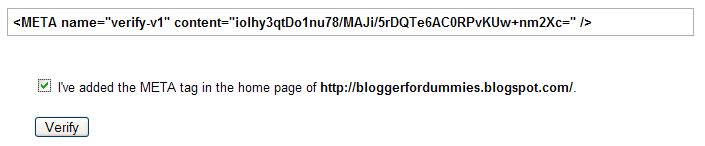
Highlight this meta tag and copy it to clipboard. Sign into Dashboard, select your blog, click TEMPLATE tab and paste the meta tag in between the <head> and </head> tags. Save and republish. Check the "I've added the META tag in the home page of http://your-blog-url.com/" box and click the [verify] button.
There will be a message "We do not know about all the pages of your site. [Submit a Sitemap] to tell us more about your site. Click [Submit a Sitemap] and in the "Choose type..." selection box, select "Add General Web Sitemap".
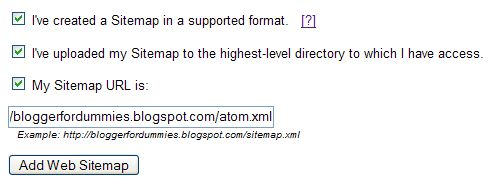 Tick
Tick[tick] I've created a Sitemap in a supported format. [?]
[tick] I've uploaded my Sitemap to the highest-level directory to which I have access.
[tick] My Sitemap URL is: [ ]
then enter the site feed URL into the "My Sitemap URL is: box. You can get the site feed url of your blog from SETTINGS. Click SETTINGS, SITE FEED tabs in the Dashboard. In the case of blogspot, just add /atom.xml to the end of the blog URL. (For example, the site feed URL of this blog is http://blogger-tricks.blogspot.com/atom.xml.) Then click " Add Web Sitemap" and you are done.
Update 22 April 2007: This post was written before New Blogger (formerly Blogger Beta) was introduced. If you are with New Blogger, use the feed URL. There are 4 possible feed URL for the New blogger:
http://yourblog.blogspot.com/atom.xml
http://yourblog.blogspot.com/rss.xml
http://yourblog.blogspot.com/feeds/posts/full
http://yourblog.blogspot.com/feeds/posts/default?alt=rss
substituting "your blog" with the actual name of your blog. The feed found by Feedburner for this blog are:
http://blogger-tricks.blogspot.com/feeds/posts/default
http://blogger-tricks.blogspot.com/feeds/posts/default?alt=rss
There is one further thing you can do, and that is to enable enhanced image search. At the bottom of the page, tick "Enhanced Image Search".
What does it mean to opt-in to enhanced image search? If you choose to enable enhanced image search, Google will use tools such as Google Image Labeler to associate the images included in your site with labels that will improve indexing and search quality of those images.
Ping Google sitemap
Now, whenever you update your blog, just ping Google sitemap by filling in the form below. Enter your blog feed url (***.blogspot.com/atom.xml) and click "Ping Google Sitemap" button.Bookmark this page so that you can return to it whenever you want to ping Google Sitemap, which should be whenever you update your blog.
Update 11 July 2007: I think I need to draw your attention to My Advice on Google Sitemaps - Verify, but Don't Submit. There was a comment in that post which makes me want to rethink and hopefully do some research when I have time and if I remember.
For your convenience, I paste that comment from that site here:
"Hello i'd like to share my experience of sitemaps with you... i have a small site - 170 pages that i launced with a sitemap - after 3 months i was frustrated with only a handful of pages showing up in the SERPS - so i removed the sitemap and voila - within 48 hours 90% of my site was crawled and my traffic rocketed. I used a Google sitemap generator tool to create the sitemap in the first place - probably wasnt correctly formatted but it still verified ok with G. The moral of the story - IMO don't use a sitemap unless you A) Know exactly what you are doing and B) you have to."
You have any information or experience regarding this, I hope you will comment and let us know.
--
Happy day, happy life!
Haven't got your own portal? Get it here! http://www.diyportals.com/
Portal Features:
A.Signup Free
B.50MB of disk space
C.1GB data transfer
D.Plenty of free Modules
E.Custom Business Module Development Services
F.The Latest DotNetNuke (04.06.02)
Sunday, October 21, 2007
个人独资企业登记管理办法
(1999年8月30日第九届全国人民代表大会常务委员会第十一次会议通过)
第一章 总则
第一条 为了规范个人独资企业的行为,保护个人独资企业投资人和债权人的合法权益,维护社会经济秩序,促进社会主义市场经济的发展,根据宪法,制定本法。
第二条 本法所称个人独资企业,是指依照本法在中国境内设立,由一个自然人投资,财产为投资人个人所有,投资人以其个人财产对企业债务承担无限责任的经营实体。
第三条 个人独资企业以其主要办事机构所在地为住所。
第四条 个人独资企业从事经营活动必须遵守法律、行政法规,遵守诚实信用原则,不得损害社会公共利益。
个人独资企业应当依法履行纳税义务。
第五条 国家依法保护个人独资企业的财产和其他合法权益。
第六条 个人独资企业应当依法招用职工。职工的合法权益受法律保护。
个人独资企业职工依法建立工会,工会依法开展活动。
第七条 在个人独资企业中的中国共产党党员依照中国共产党章程进行活动。
第二章 个人独资企业的设立
第八条 设立个人独资企业应当具备下列条件:
(一)投资人为一个自然人;
(二)有合法的企业名称;
(三)有投资人申报的出资;
(四)有固定的生产经营场所和必要的生产经营条件;
(五)有必要的从业人员。
第九条 申请设立个人独资企业,应当由投资人或者其委托的代理人向个人独资企业所在地的登记机关提交设立申请书、投资人身份证明、生产经营场所使用证明等文件。委托代理人申请设立登记时,应当出具投资人的委托书和代理人的合法证明。
个人独资企业不得从事法律、行政法规禁止经营的业务;从事法律、行政法规规定须报经有关部门审批的业务,应当在申请设立登记时提交有关部门的批准文件。
第十条 个人独资企业设立申请书应当载明下列事项:
(一)企业的名称和住所;
(二)投资人的姓名和居所;
(三)投资人的出资额和出资方式;
(四)经营范围。
第十一条 个人独资企业的名称应当与其责任形式及从事的营业相符合。
第十二条 登记机关应当在收到设立申请文件之日起十五日内,对符合本法规定条件的,予以登记,发给营业执照;对不符合本法规定条件的,不予登记,并应当给予书面答复,说明理由。
第十三条 个人独资企业的营业执照的签发日期,为个人独资企业成立日期。
在领取个人独资企业营业执照前,投资人不得以个人独资企业名义从事经营活动。
第十四条 个人独资企业设立分支机构,应当由投资人或者其委托的代理人向分支机构所在地的登记机关申请登记,领取营业执照。
分支机构经核准登记后,应将登记情况报该分支机构隶属的个人独资企业的登记机关备案。
分支机构的民事责任由设立该分支机构的个人独资企业承担。
第十五条 个人独资企业存续期间登记事项发生变更的,应当在作出变更决定之日起的十五日内依法向登记机关申请办理变更登记。
第三章 个人独资企业的投资人及事务管理
第十六条 法律、行政法规禁止从事营利性活动的人,不得作为投资人申请设立个人独资企业。
第十七条 个人独资企业投资人对本企业的财产依法享有所有权,其有关权利可以依法进行转让或继承。
第十八条 个人独资企业投资人在申请企业设立登记时明确以其家庭共有财产作为个人出资的,应当依法以家庭共有财产对企业债务承担无限责任。
第十九条 个人独资企业投资人可以自行管理企业事务,也可以委托或者聘用其他具有民事行为能力的人负责企业的事务管理。
投资人委托或者聘用他人管理个人独资企业事务,应当与受托人或者被聘用的人签订书面合同,明确委托的具体内容和授予的权利范围。
受托人或者被聘用的人员应当履行诚信、勤勉义务,按照与投资人签订的合同负责个人独资企业的事务管理。
投资人对受托人或者被聘用的人员职权的限制,不得对抗善意第三人。
第二十条 投资人委托或者聘用的管理个人独资企业事务的人员不得有下列行为:
(一)利用职务上的便利,索取或者收受贿赂;
(二)利用职务或者工作上的便利侵占企业财产;
(三)挪用企业的资金归个人使用或者借贷给他人;
(四)擅自将企业资金以个人名义或者以他人名义开立帐户储存;
(五)擅自以企业财产提供担保;
(六)未经投资人同意,从事与本企业相竞争的业务;
(七)未经投资人同意,同本企业订立合同或者进行交易;
(八)未经投资人同意,擅自将企业商标或者其他知识产权转让给他人使用;
(九)泄露本企业的商业秘密;
(十)法律、行政法规禁止的其他行为。
第二十一条 个人独资企业应当依法设置会计账簿,进行会计核算。
第二十二条 个人独资企业招用职工的,应当依法与职工签订劳动合同,保障职工的劳动安全,按时、足额发放职工工资。
第二十三条 个人独资企业应当按照国家规定参加社会保险,为职工缴纳社会保险费。
第二十四条 个人独资企业可以依法申请贷款、取得土地使用权,并享有法律、行政法规规定的其他权利。
第二十五条 任何单位和个人不得违反法律、行政法规的规定,以任何方式强制个人独资企业提供财力、物力、人力;对于违法强制提供财力、物力、人力的行为,个人独资企业有权拒绝。
第四章 个人独资企业的解散和清算
第二十六条 个人独资企业有下列情形之一时,应当解散;
(一)投资人决定解散;
(二)投资人死亡或者被宣告死亡,无继承人或者继承人决定放弃继承;
(三)被依法吊销营业执照;
(四)法律、行政法规规定的其他情形。
第二十七条 个人独资企业解散,由投资人自行清算或者由债权人申请人民法院指定清算人进行清算。
投资人自行清算的,应当在清算前十五日内书面通知债权人,无法通知的,应当予以公告。债权人应当在接到通知之日起三十日内,未接到通知的应当在公告之日起六十日内,向投资人申报其债权。
第二十八条 个人独资企业解散后,原投资人对个人独资企业存续期间的债务仍应承担偿还责任,但债权人在五年内未向债务人提出偿债请求的,该责任消灭。
第二十九条 个人独资企业解散的,财产应当按照下列顺序清偿:
(一)所欠职工工资和社会保险费用;
(二)所欠税款;
(三)其他债务。
第三十条 清算期间,个人独资企业不得开展与清算目的无关的经营活动。在按前条规定清偿债务前,投资人不得转移、隐匿财产。
第三十一条 个人独资企业财产不足以清偿债务的,投资人应当以其个人的其他财产予以清偿。
第三十二条 个人独资企业清算结束后,投资人或者人民法院指定的清算人应当编制清算报告,并于十五日内到登记机关办理注销登记。
第五章 法律责任
第三十三条 违反本法规定,提交虚假文件或采取其他欺骗手段,取得企业登记的,责令改正,处以五千元以下的罚款;情节严重的,并处吊销营业执照。
第三十四条 违反本法规定,个人独资企业使用的名称与其在登记机关登记的名称不相符合的,责令限期改正,处以二千元以下的罚款。
第三十五条 涂改、出租、转让营业执照的,责令改正,没收违法所得,处以三千元以下的罚款;情节严重的,吊销营业执照。
伪造营业执照的,责令停业,没收违法所得,处以五千元以下的罚款。构成犯罪的,依法追究刑事责任。
第三十六条 个人独资企业成立后无正当理由超过六个月未开业的,或者开业后自行停业连续六个月以上的,吊销营业执照。
第三十七条 违反本法规定,未领取营业执照,以个人独资企业名义从事经营活动的,责令停止经营活动,处以三千元以下的罚款。
个人独资企业登记事项发生变更时,未按本法规定办理有关变更登记的,责令限期办理变更登记;逾期不办理的,处以二千元以下的罚款。
第三十八条 投资人委托或者聘用的人员管理个人独资企业事务时违反双方订立的合同,给投资人造成损害的,承担民事赔偿责任。
第三十九条 个人独资企业违反本法规定,侵犯职工合法权益,未保障职工劳动安全,不缴纳社会保险费用的,按照有关法律、行政法规予以处罚,并追究有关责任人员的责任。
第四十条 投资人委托或者聘用的人员违反本法第二十条规定,侵犯个人独资企业财产权益的,责令退还侵占的财产;给企业造成损失的,依法承担赔偿责任;有违法所得的,没收违法所得;构成犯罪的,依法追究刑事责任。
第四十一条 违反法律、行政法规的规定强制个人独资企业提供财力、物力、人力的,按照有关法律、行政法规予以处罚,并追究有关责任人员的责任。
第四十二条 个人独资企业及其投资人在清算前或清算期间隐匿或转移财产,逃避债务的,依法追回其财产,并按照有关规定予以处罚;构成犯罪的,依法追究刑事责任。
第四十三条 投资人违反本法规定,应当承担民事赔偿责任和缴纳罚款、罚金,其财产不足以支付的,或者被判处没收财产的,应当先承担民事赔偿责任。
第四十四条 登记机关对不符合本法规定条件的个人独资企业予以登记,或者对符合本法规定条件的企业不予登记的,对直接责任人员依法给予行政处分;构成犯罪的,依法追究刑事责任。
第四十五条 登记机关的上级部门的有关主管人员强令登记机关对不符合本法规定条件的企业予以登记,或者对符合本法规定条件的企业不予登记的,或者对登记机关的违法登记行为进行包庇的,对直接责任人员依法给予行政处分;构成犯罪的,依法追究刑事责任。
第四十六条 登记机关对符合法定条件的申请不予登记或者超过法定时限不予答复的,当事人可依法申请行政复议或提起行政诉讼。
第六章 附则
第四十七条 外商独资企业不适用本法。
第四十八条 本法自2000年1月1日起施行。
--
Happy day, happy life!
Tuesday, October 09, 2007
Procedure to combine the 0x89ABCDEF and 0x76543210 as 0x765432EF
#include <stdlib.h>
/*
Procedure to combine the
0x89ABCDEF and 0x76543210
as 0x765432EF
*/
int main(int argc, char* argv[])
{
int x = 0x89ABCDEF;
int y = 0x76543210;
int z = (x & 0xFF) + (y & ~0xFF);
printf("%X \n",z);
system("PAUSE");
return 0;
}
--
Happy day, happy life!
Procedure to identify the machine is little endian or big endian
#include <stdlib.h>
/*
Procedure to identify the machine is
little endian or big endian
*/
// Using
// Compile it and run it on the target machine which you want to check.
typedef unsigned char* byte_pointer;
int is_little_endian()
{
int test = 0x0000FFFF;
int i;
byte_pointer p = (byte_pointer)&test;
return p[0] == 0xFF;
}
int main(int argc, char* argv[])
{
printf("Current machine is%slittle endian \n",is_little_endian()? " ":"not");
system("PAUSE");
return 0;
}
--
Happy day, happy life!